The Teaching Hub, February 2022, Vol. 2.5.

multi-coloured chalk

Teaching with Technology

By Amanda Robinson, Teaching & Learning Specialist, LDS Team
 

I have been working as a Teaching & Learning Specialist with LDS for approximately nine months and I’m consistently inspired by all of the ways–large and small–that faculty have integrating technology in meaningful ways to benefit learners. 

For this edition of the Teaching Hub, LDS Team wanted to highlight high impact tech tools that you can use to engage and assess your students and promote engagement, both online and in the classroom.

The Learning Design and Support website is an excellent place to start! In this space you will find step-by-step instructions to enable tech integration and support, specifically those that Fleming holds an institutional license to, including:

  • Our Learning Management Software, Brightspace (D2L)
  • Webex, our video conferencing tool
  • MS Teams,
  • Office 365, which offers a suite of software to support communication, documentation, spreadsheets, planning and project management tools
  • TurnItIn, an originality detection software that also supports grading
  • Video Streaming
  • Content Creation
  • Engagement Technology, like polls and surveys
  • WordPress, a open access publishing tool

D2L Integration

Brightspace, or Desire2Learn (D2L) as it is known more generally, is perhaps our best and most powerful tool to support content display and meaningful learning opportunities. New or old to D2L, the functionality is endless, particularly when it comes to HTML file creation and development. This can be intimidating at first, but the best thing about D2L, in my humble opinion, is the availability of troubleshooting resources, TIP sheets, and tutorials available to anyone on the web.

Regardless the mode of delivery you are working with at Fleming College, D2L is an essential tool to enable learner access of the required materials for your course, but also a space to communicate the expectations and key milestones, track learner progress, author practice activities, and build classroom community.

By virtue of using D2L, you are a member of the Brightspace community. In addition to the D2L support offered to Fleming faculty members through LDS Team, including the wealth of knowledge offered by Alana Callan, our Digital Design Specialist, you have access to Brightspace community forums. This space  you can use keywords to search for a range of topics to support you in using D2L meaningfully.

Discussion Boards

In addition to graded discussion forums, D2L offers the option to enable non-graded discussion boards for learners, which is a viable and easy place to set up a learning space to augment other components of in-person and online delivery. Personally, I was a fan of the discussion board long before the pandemic.

Here are some of my most durable pieces of advice for setting up dynamic and interactive discussion boards for students:

  • Include an FAQ discussion thread for general course questions, to report broken links, or to ask peers questions. Encourage students to check and post here before sending an email. Let them know when it is being monitored and what things warrant a personal message to you (like an accommodation, or personal grading matters). 
  • Use a discussion forum for general introductions and icebreakers throughout the term. 
  • Set up a discussion board in advance when your students are doing  group work or breakout rooms in class, or even for group project work. Have them record and display their answers on the board so it can stand as visible draft work or collaborative study notes. 
  • Encourage students to post images or videos in the HTML field of the discussion board, and teach them how to do this, or provide a guide. This enables digital literacy skills. 
  • Set clear expectations for the use of discussion boards. Remind them that they are bound to academic conduct policies. Consider including a netiquette and online expectations statement in your learning materials that prompts them to act in accordance with professional suitability.
  • Purposely write reflective prompts, rather than those that simply require students to restate information in the course, or answer yes or no questions. 

You can access the Brightspace Community to learn more about the technical setup and functionality of Discussion forums and topics. Lastly, this blog from the University of Calgary, Making Discussion Boards Work, offers other creative ideas and things to consider as your experiment with Discussion Boards. 

Quizzing, Polling, and Surveys

If your class is delivered in-person, or another mode of delivery, D2L quiz tools are a viable option to assess student’s formative knowledge. Consider having an optional practice quiz available in D2L for students to test and consolidate their knowledge. You may also decide to have students author and submit questions for practice quizzes, which brings them into the learning planning. Instructors can also open these quizzes with students and complete the questions together, either in-person or via screen share. Brightspace Tutorials is a YouTube channel with a volume of short video tutorials to help you maximize your use and integration of D2L.

As you are likely aware, there are hundreds, if not thousands, of tech integrated teaching tools available to instructors; it is easy to get overwhelmed! Start small, select one or two of these and test them out with your students. Many of these tools can work in a physical classroom space, or in an asynchronous or synchronous environment. The University of British Columbia has compiled a Nifty Teaching Tools repository that gives an accessible and visually illustrate overview of some of the best teaching tools to support interactivity, including several of my own favorites, Padlet and Poll Everywhere.  

Lastly, whatever technology you select, assume that students will struggle to use it, and you might too! Be deliberate with how and where you use it, and don’t rely on it too heavily that if something goes wrong, you can’t substitute it for another activity in the classroom. Remember, the technology augments the teaching, not the other way around! However you opt to support your students with technology, know that you are giving them new avenues to explore and test their ideas, and that is the most important part of what we do as educators and mentors. Even if trying a new tech tool or strategy doesn’t go perfectly, well it is an opportunity for students to observe that Professors also make mistakes and struggle, just like them! 

The Teaching Hub, December 2021, Vol. 2.4

The Teaching Hub overlaid on a snowy winter backdrop

The LDS Team wishes faculty and the wider Fleming College community a joyful holiday season and safe Winter break!

Happy December faculty members! As you prepare to wrap-up teaching and grading for the F2021 term, we wanted to kick-off our last issue of 2021 with a warm message of gratitude for all the work have you done this term. 

As a reminder, the LDS Team website has excellent tip sheets, resources, and supports for you to consult. You can access them here: LDS Team Website.  For the new year and new term, you might consider having LDS Team can prepare school/faculty specific presentations related to specialized topics in teaching & learning, including assessments, teaching with technology, and designing online for flexibility. Experienced faculty, or anyone interested in this LDS service, might consider utilizing this kind of support through the LDS website. You can access more information, including how to submit a request, here: LDS Team – Faculty Development Request

We understand that this time of year can bring fatigue, but it also offers everyone the chance for rest, renewal, and reflection. With the challenges that 2022 will come with, we want to remind you that LDS Team is here to support you and is thinking about the kinds of programming and support you will need in the upcoming W2022 term. Based on the feedback from the W2022 Week 0 – presurvey sent out from the LDS email, faculty have identified several priority areas for LDS training. These include offerings that focus on flexible assessment, supporting digital literacy among faculty and students, and the continued use and implementation of eTools.

LDS is planning on delivering a mix of our standard and pre-recorded offerings for faculty who anticipate that Week 0 will be busy with the return to campus and preparations for Week 1. There will, however, be two new offerings running for faculty to attend. One that focuses on flexible assessment, and another that will offer faculty the chance to learn how to download and use Camtasia to create and edit video presentations to support content display and/or student assessment. 

The full schedule and descriptions are available here: LDS Team Schedule.  We hope to see you then! 

Flexible Due Dates 

By Charlene Kloos, Curriculum Development Consultant, LDS Support Team

This chart outlines how flexible due dates support an optimized environment for learning.

As a faculty member, how much of your time and energy is spent dealing with assessment due dates?  Think about all the steps you take to prompt students, including the reminders you send, plus the time you dedicate to handling issues, student questions, and extension requests.

Perhaps you find that your students are young, straight out of high school and unprepared for the rigors of balancing college, paid employment, caring for dependent family members, managing with personal issues and so on. The reasons that students ask for accommodations are varied, and even high achievers sometimes need additional time to do their best work.  

If you have considered any of these factors, or constraints for your students, flexible due dates might be the solution to some of these things! 

The science of learning shows that when educators are flexible with due dates, it can reduce stress, anxiety, and other issues for students, while also increasing the quality of their learning and work. The other benefit is that faculty can focus their time on more important and productive matters than handling extension inquiries, and submissions spread out over a short time can make marking more manageable. 

Not all assignments or courses lend themselves to flexible due dates, and this is not a one-size-fits-all solution. However, most faculty could (and even should) consider ways to increase flexibility, especially with the impacts and changes of the COVID-19 pandemic on our learners and education, remote delivery, and helping students transition to on-campus learning. Can you think of one assignment in a course you teach that may be suitable for flexible due dates? Start there! Many students want, need, and may expect it, and flexibility fits with Universal Design for Learning principles and best practices. Under UDL, the goal is to optimize the learning environment and reduce barriers to education for vulnerable and underrepresented populations, a key priority under Fleming’s Strategic and Academic plans.  

Like many things, there seems to be two extremes when it comes to flexible due dates. On one side we have fixed policies that state that all students must meet the specified deadline or receive 0. There may be a tiny bit of flexibility such as extensions to those who request it, extra time based on formal accommodation plans, late penalties, etc. The instructor or program sets the rules, and all students are to abide by the due date schedule…or else.  

On the other side, some courses (especially asynchronous online ones) can be organized so students go-at-their-own-pace. With complete control over deadlines; they can hand anything in at any time during the semester.  

Instead of the extremes, here are a few ideas that fall in the middle: 

  • Providing a time period not a hard date for when students need to hand an assignment in. E.g., during Weeks 4 and 5 or between November 1 – 12. You might refer to this as a ‘window of submission’.
  • Negotiating Due Dates – allow students a say at the start of a course for when assessments are due, and share power in the decision making. As a bonus, they practice important skills like negotiating, planning, scheduling, flexibility, and adaptability. 
  • Building in an Automatic Grace Period  Set a suggested deadline but give students a few extra days to submit it if needed without penalty and without need to notify the instructor. E.g., Set quizzes in D2L to close 2 or 3 days after the posted due date; or if normal assignment due dates fall on Fridays, automatically give students till Monday. 
  • Catch Up/Make Up Week: Students can submit any missed assignments during one scheduled and advertised week. E.g., during Week 8, students can submit any missed work from Weeks 1 – 7, to allow them the chance to get back on track. If applying a late penalty to all work handed in during this week it should be minimal/reasonable to encourage and not dissuade participation (e.g. 5-10%). 

If you want to learn more about the reasons and benefits for negotiating due dates as a class activity read:  

For individual student-determined deadlines read: 

For more ideas and to read about faculty experiences, check out: 

Lastly, whatever due date structure you decide on, make sure to widely promote it and do so repeatedly in the course outline/syllabus, in classes, and within D2L. Giving students a clear idea of what the expectations and policies are will resolve confusion or uncertainty among your population of learners. Adding some flexibility to due dates in your courses should be a win/win for you and your students, so try different ideas, tailor them to your courses, and see what works!  

If you are interested in learning more about flexible due dates, and seeing some examples of this, you can plan to attend LDS Team’s upcoming Teaching & Learning session on Flexible Assessment Design in Week 0 of the Winter 2022 academic term!

Happy new year graphic

That’s all for the December 2021 edition of The Teaching Hub, but we are looking for your teaching and learning contributions in January 2022. 

Please reach out to us at LDSTeam@flemingcollege.ca to suggest and contribute content! 

Until then, Happy New Year from the Fleming LDS Support Team!

Alana, Charlene, Andrew & Amanda

The Teaching Hub, November 2021, Vol. 2.3

We want you to get excited about inclusive practices and the value of universal design!

This SSRHC insight video highlights what UDL advocates for — the idea that traditional models of education does not effectively meet the needs of all learners. When we aim for the ‘standard learner’, someone will always be left out!  

You Say Inclusive, I Say Universal

Greetings faculty members, staff, students, and the wider Fleming community. As we arrive at the mid-point of the Fall 2021 academic term, the LDS team wanted to send a warm message of gratitude to Fleming members as we turn our attention to Week 8, and further explore theme of inclusive teaching practice.  What does it mean to plan deliberately for inclusivity when designing a learning space? Week 8 will explore the ‘how’ of inclusive practice by approaching it from the perspective of universal design. 
 

Universal Design for Learning (UDL) is a theory and framework that  intentionally plans for all learners by embracing the idea that individual learners arrive to any learning space with variant preferences, needs, and capabilities (Rose, 2012). It was developed in the 1980s at the Centre for Applied Special Technology. As a viable theory for encouraging and measuring learning, it undergone updates and development over the past several decades, culminating in a framework that encourages multiple means of engagement, representation, and action and expression in a learning environment (CAST, n.d.). 

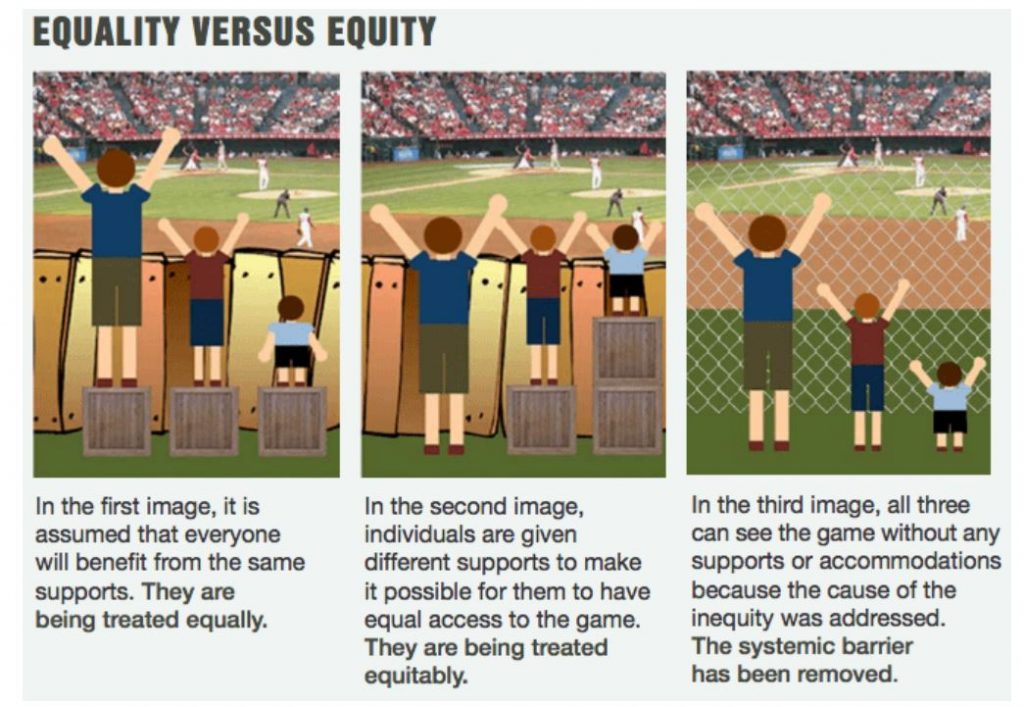
Image illustrates the difference between equality, equity and justice and uses height as a comparison
Courtesy of Courtesy Advancing Equity and Inclusion: A Guide for Municipalities, by City for All Women Initiative (CAWI), Ottawa

As the image and captions above illustrate, barrier free access to the built and intellectual environment doesn’t just help those who need accommodations, it creates a more inclusive and immersive environment for all!  Beyond serving as a model to reach students who are managing specific access barriers to education because of the vulnerabilities they may face, UDL challenges traditional approaches to education and learning by proposing a revolutionary idea–that all learners benefit from a more accessible learning environment (Meyers, Rose & Gordon, 2014). This an achievable goal that binds our shared intellectual community, and underpins our discussions in Week 8. 

The LDS Team, in collaboration with the VPAE’s office, faculty, and staff, invite you to learn more about UDL, including how to implement it into your teaching and learning practice, in our Teaching & Learning sessions, running from October 26 to 28. We will kick things off on Tuesday, October 26 from 9-11 a.m. with the launch of our new UDL module and a keynote presentation from Dr. Kate Snyder, Director of the Centre for Teaching and Learning at Nova Scotia Community College, with an introduction from our VPAE, Dr. Stephanie Dimech. 
 
Let’s come together to share and discuss best and emerging practices for creating inclusive teaching and learning environments and consider how to support our community with the return to on-campus activities. You can access the full schedule, session descriptions, and register for individual sessions here: LDS Team Schedule.docx.
 
Can’t wait to get started? Scroll down to learn more about UDL and get a  sneak peak at some of the featured speakers and events.
 
References
  • CAST. (n.d.). CAST Timeline. Retrieved from Link to CAST  
  • Meyer, A., Rose, D. & Gordon, D. (2014). Universal Design for Learning: Theory and Practice. Retrieved from LINK
  • Rose, T. (2012). Todd Rose: Variability Matters. Retrieved from LINK
 
visual of UDL guidelines

Universal Design for Learning illustrates that learning happens across affective, recognition, and strategic networks. Source: CAST. (n.d.) Universal Design for Learning Guidelines. Retrieved from  LINK

Spotlight on Inclusive Practice: UDL for Beginners

As we will learn in Week 8, Universal Design for Learning isn’t just a theory, it is a compilation of sign posts and practices that advance the idea that planning for multiple means of representation, action, and engagement makes our learning environments more inclusive.

There isn’t one right or wrong way to implement UDL, but there is a broader need for UDL when considering the ways in which it can support an educational environment underpinned by a duty to accommodate. One of the central goals of the Accessibility for Ontarians with a Disability Act (AODA)  is a barrier free society. Universal Design for Learning supports this mandate in several ways, including the goal of removing barriers for communication and improving access to assistive technology as a standard of the learning environment, rather than an add-on. In this way, both the AODA and UDL are aligned in the idea that a barrier-free society is essential for some, but good for all!

New to UDL and want to learn more? Access these essential resources for additional information from the Center for Applied Special Technology:

CAST. (n.d.). Provide Multiple Means of Engagement. Retrieved from http://udlguidelines.cast.org/engagement

CAST. (n.d.). Provide Multiple Means of Action and Expression. Retrieved from http://udlguidelines.cast.org/action-expression

CAST. (n.d.) Provide Multiple Means of Representation. Retrieved from http://udlguidelines.cast.org/representation

Teaching & Learning Sessions: A Sneak Peak

Join us in Week 8 to learn about the challenges and promises of inclusive and culturally responsive pedagogy! In doing so you will also get to hear from experts in inclusive learning environments, including insights from:

Our UDL keynote speaker, Dr. Kate Synder, who will be introduced by our VPAE, Dr. Stephanie Dimech. Dr. Snyder is Director of the Centre for Teaching and Learning at Nova Scotia Community College where she works with faculty, staff, and administration to support a culture of teaching and learning grounded in equity, excellent, and innovation. Dr. Snyder has dedicated her career to supporting students and their learning across education systems. Learn more about Dr. Synder’s research and area of expertise here: LINK 

Dr. Barbara Roberts, who will speak on our Student Experience Panel alongside Fleming students. Dr. Roberts recently retired as Executive Director of the WorkLife Office and Senior Advisor to the Provost for WorkLife at Michigan State University, where she also held an adjunct faculty appointment in the College of Education. Dr. Roberts’ expertise is in how individuals participate successfully in education environments, facilitating a climate where all individuals are respected and supported in their work and personal lives.  Her work focuses on how structures include or exclude people with disabilities, and the impact of policy and practice on inclusion. Dr. Roberts consults with colleges and universities across Canada on inclusion and accommodation. Watch Dr. Roberts give a presentation on inclusive practice here: Accommodation vs. Accessibility: A Pro-active Approach by Barbara Roberts 

Stephanie  Moeser, an expert who works with youth and young adults with mood disorders, anxiety, and ADHD, will also participate in our Student Experience Panel. Stephanie  is a registered social worker with a Bachelor of Social Work from Ryerson University and a Masters of Social Work from University of Toronto. Stephanie has a specialization in working with children, youth, and adults with Autism Spectrum Disorder and co-ocurring mental health concerns. She has worked in both clinical and management positions at Geneva Centre for Autism and managed a dual-diagnosis program at COTA Health in Toronto. You can access Stephanie’s website here: Link

Our lineup also includes:
 
  • A panel that explores the challenges and opportunities of the return to more on-campus instruction
  • Sessions that focus on universal design, inclusive pedagogy, and technology enhanced learning 
  • A faculty showcase that will highlight the innovative work of Fleming faculty members
  • Opportunities for social connection, networking, and reflective practice
 
What are you waiting for? You can access the full schedule and register for individual sessions here: LDS Team Schedule.docx.
 
See you there!
 
The Learning Design & Support Team
Alana, Charlene, Andrew & Amanda

We’d like to hear from you!

The Teaching Hub is a monthly collection of things educators at Fleming College might like to know about, doled out in small chunks, curated by the Learning Design & Support Team. 

We welcome ideas, feedback, and teaching & learning content suggestions here: LDSTeam@flemingcollege.ca

The Teaching Hub, October 2021, Vol. 2.2


As we approach September 30, National Day for Truth and Reconciliation, the Learning Design & Support Team wants to acknowledge and give thanks for the valuable role that Indigenous faculty, staff, and students play at Fleming and in the wider community. Although this is the first official date, we recognize that this date is precipitated by centuries of systemic legal and social inequality. At the heart of this is a national tragedy and shame that was inflicted upon Indigenous communities at the hands of the Canadian state and society–forced assimilation and the Residential school system. 

Fleming is committed to Truth and Reconciliation through reflecting on our past, owning our truth, and inclusion of Indigenous intellectual and cultural traditions in our curriculum and learning approaches. Fleming College has many events and initiatives leading up to the day to commemorate the occasion. You can learn more about Fleming’s commitment to the inclusion of Indigenous perspectives here: Fleming College marks National Day of Truth and Reconciliation

Truth and Reconciliation Events and Programming

Fleming College, Virtual talk by Dr. John Milloy– Monday, Sept. 27 at 3 p.m. 

    • An acknowledged expert on Canada’s residential school system, Dr. Milloy will share his experience as the director of research and special adviser for the Truth and Reconciliation Commission (2008-2015). As a member of the Royal Commission on Aboriginal Peoples (1991-1996), Dr. Milloy researched and produced a detailed report, which was later published as a book A National Crime: The Canadian Government and the Residential School System, 1879 to 1986. In collaboration with Student Experience and Indigenous Services, Dr. Milloy will address the Fleming community and be introduced by Fleming President Maureen Adamson, and the event will be hosted by Fleming’s Academic Chair for Indigenous Perspectives Liz Stone.  This event is co-presented by Student Experience and Indigenous Student Services. Click here to join this public event on Zoom. Meeting ID: 884 4823 2152 / Passcode: Fleming 

Indigenous Student Services at Fleming College – A Time for Reflection, Sept. 30

    • A social media campaign is planned to engage the students and community with various resources and events. The College community is invited to share pictures wearing orange shirts with the tag #MiigwechFleming

Indigenous Student Services at Fleming – Video Launch, Sept. 30 

    • Members of the Fleming community, Indigenous and settlers, come together for a conversation about what the National Day for Truth and Reconciliation means to them. The video will be released on September 30.

National Centre for Truth and Reconciliation, Sept. 27 – Oct. 1

      • This is a virtual event open to all Canadian schools for youth grades 5 – 12. To celebrate the success of last year’s online event, Every Child Matters, National Centre for Truth and Reconciliation at the University of Manitoba is proud to present a full week of Truth and Reconciliation programming. This is a 5-day national event that will continue the conversations from Every Child Matters. Important conversations including the truths of the Indigenous treaties, First Nation, Métis and Inuit land claims, and the residential schools system. This online event will provide historical workshops, exclusive video content, and activities for students — all supported by artistic and cultural performances by First Nations, Métis, and Inuit artists.

Indigenous Perspectives: Teaching Supports

Indigenous perspectives share with learners’ aspects of Indigenous people’s knowledge, perspectives, and experiences and our shared history and experience as individuals living in Canada, through their inclusion into the learning content, design, and delivery of a course or program of study 

Indigenous perspectives use Indigenous peoples’ ways of knowing and ways of living in the world that include, among other things, ecological ways of knowing, histories, identities, cultural practices and traditions, languages, community engagement, governance, and community dynamics.   

Fleming College’s Indigenous Perspectives and Program Teams are committed to providing high quality and vocationally specific education that draws upon the CiCan Indigenous Education Protocol, the Truth & Reconciliation Commission’s Calls to Action and the United Nations Declaration on the Rights of Indigenous People. 

Learning Design and Support

Incorporating Indigenous perspectives into your curriculum begins with critically examining the frame of reference through which traditional curriculum and learning activities have been designed.  

Educators must then decide when, where, and how to encourage learners to explore the histories, cultures, languages, contributions, perspectives, experiences and contemporary contexts of First Nations, Métis and Inuit peoples while engendering knowledge, understanding and respect. 

The Learning Design and Support Website has a variety of resources to support the integration of Indigenous Perspectives into your teaching and learning practice. You can access some of them below.

Another important and new educational tool for faculty and subject-matter-experts that we want to draw attention is the Curriculum Development Handbook and the Curriculum Development Tipsheet. The handbook is a living document designed by Charlene Kloos, Curriculum Development Consultant in the LDS Team. The handbook and tip sheet each provide guidelines on best practices on competency based learning and curriculum alignment mapping. These documents support the integration of and inclusive curriculum development and design, which fits with Fleming College’s approach to accessible education. 

 Academic Integrity

In expanding supports for Academic Integrity at Fleming, efforts are underway to develop materials to broaden the understanding of academic integrity from a variety of ethical perspectives. Last year, thanks to the work of B.J. Maracle, an Indigenous Learning Strategist at the University of Toronto, library staff modified and shared the “Seven Grandfathers In Academic Integrity<https://fleming.libguides.com/ld.php?content_id=35419200>” to connect academic integrity concepts to the Seven Grandfather teachings.

We are excited to share that Academic Integrity and Copyright Officer, Marcia Steeves, and Faculty, Ann Hines will be working together this year to bring together past experience with restorative practices and existing research in the application of restorative practices within academic integrity to bring forward restorative options for students and faculty. Restorative practices, rooted in Indigenous knowledge and practices, can provide students with the opportunity to openly accept responsibility for their actions and work to repair relationships with those that are harmed by their actions. These practices can also provide participants with experiential learning that will benefit them beyond the classroom. We look forward to sharing more as this project develops over the coming months.

Library Services

Fleming Library provides live chat help, reference appointments, workshops, and self-directed live chat help, reference appointments, workshops, and self-directed online help-guides. Contact us to book a library technologist for an in-class workshop on research skills & strategies using library resources, citations, academic integrity and more.

For Truth and Reconciliation Week, we would also like to highlight the following Library resources:

Please note that Fleming Library is participating in an Ontario College Libraries working group to address the structural biases and inappropriate language found in the Library of Congress Subject Headings. This initiative addresses The CFLA Truth and Reconciliation Committee Report and Recommendations 5th recommendation for libraries to decolonize access and classification.  As this work continues, we have posted a notice in the catalogue of our commitment to update records with appropriate language.  

Additional Resources

Professional Development Opportunities

Facilitated Ontario Extend Sessions: September 20 – December 11 

    • This Fall we are continuing to offer all six Extend modules as FREE English language facilitated courses with optional synchronous and asynchronous check-ins delivered in the Brightspace Learning Management System. Our flexible delivery schedule offers multiple opportunities to engage with the Extend program with no sign-up required to attend any of these facilitated sessions – you can mix and match as you please! You have the option of attending any of the following module focused sessions:   View the full schedule and register today

We’d like to hear from you!

The Teaching Hub is a weekly collection of things educators at Fleming College might like to know about, doled out in small chunks, curated by the Learning Design & Support Team. 

In the remaining issues of 2021, The Teaching Hub will focus on pedagogical approaches to equity, diversity, and inclusion. We welcome ideas, feedback, and teaching & learning content suggestions here: LDSTeam@flemingcollege.ca 

The Teaching Hub, September 2021, vol. 2.1

multi-coloured chalk and dust arranged like a rainbow

Welcome Back!

A hearty welcome and warm hello to Fleming faculty, staff, students, and members of the wider community!
 

The start of a new academic year arrives with a range of emotions from faculty and students–excitement, anxiety and, for some, the promise of a fresh start in  a new academic year. However you may, or may not, feel about entering another school year, The Teaching Hub is here to support you in your teaching and learning practice, including Brightspace (D2L), Webex, MSTeams, Respondus, Office365, TurnItIn, Video Streaming, and WordPress.

This month’s edition of the Hub will provide general staffing and accessibility updates, direct and refresh faulty on the resources, services, and tools offered to them, and give a preview of fresh things to come in 2021 – 2022 editions of The Hub.

In this issue:

  • LDST Staff and Schedule Updates
  • LDST Resources and Tools at a Glance
  • Tech Updates: ReadSpeaker
  • What’s New with Accessible Education Services

LDST Staff and Schedule Updates

The Learning Design and Support Team has some new faces! In the Spring, the Team welcomed the addition of Charlene Kloos as a Curriculum Development Consultant, and Andrew Wells and Amanda Robinson as Teaching & Learning Specialists. 

Week 1 is barreling towards us! In advance of the semester start, the LDSTeam is here to help, and wants to direct toward our expanding scheduled for August 30 – Friday September 3. You can access sessions descriptions here:  LDS Schedule

Please note that as of publishing, the Student Experience Panel link has not been set up, please check the LDS schedule above for room link closer to the session. 

Monday
August 30

Tuesday
August 31

Wednesday 
September 1

Thursday
September 2

Friday
September 3

8:00 

9:00 

Teaching & Learning
Boot Camp

Learning Technology
Drop-In

Learning Technology
Drop-In

10:00 

Academic
Integrity Process Overview

Receiving
a Sexual Violence Disclosure from a Student: The Role of Faculty and other
Fleming Employees

(10:00 – 11:30) 

11:00 

Teaching &
Learning Drop-in

Library
Services: Streaming Video in the Classroom

Teaching &
Learning Drop-in

12:00 

1:00 

Student Experience Panel 
(1:00 – 2:30 p.m.)* 

Supporting
The Mental Health Of LGBTQ+ Students During Uncertain Times

2:00 

Learning Technology
Drop-In

3:00 

Learning Technology
Drop-In

Learning Technology
Drop-In

Learning Technology
Drop-In

4:00 

5:00 

Teaching &
Learning Boot Camp

6:00 

*Note – at time of publishing, the Student Experience Panel has already happened. A recording is available here: Student Experience Panel Recording

LDS Resources and Tools at a Glance

 
Teaching and learning in the post-secondary system can sometimes feel isolating and overwhelming, especially during those crunch times at the start and end of term, or during intense periods of course development and assessment. The LDS is here to help. We have a group of staff who can direct you to internal and external resources to support you in solving tech problems and help you to use technology meaningfully in your teaching practice. On the LDS Team Website you will find resources on the following topics:
 
  • Designing for Accessibility
  • Course Design & Content Development
  • Learning Outcomes and Assessment
  • Classroom Management and Engagement Techniques
  • Teaching Practice & Professional Development
  • Integrating Technology Meaningfully into your Teaching Practice
Faculty can also access a full compliment of tech support resources, including those designed to support you in your professional development as an educator.
 

If you don’t find the support item you are looking for, you can submit an LDS Project Form: here.

New to Teaching at Fleming?

In addition to the teaching and learning resources and support outlined above, new faculty are encouraged to access and review the Contract Faculty Experience. These modules are designed to support you in your first term teaching at Fleming College. You can access the full suite of training here: New Contract Faculty Experience

Professional Development Opportunities

LDS Team was recently sent this free professional development for educators. Courses begin on August 30, 2021. Here is an excerpt from the program description:

“As part of OECM’s ongoing commitment to pursue innovative and creative solutions that foster an exceptional customer experience, we are delighted to provide Ontario’s K-12 and post-secondary educators with exclusive access to this new PL program. These interactive and diverse, application-based virtual webinars, courses and small-group collaborations are free to access and attend and are facilitated by accomplished education leaders. The sessions are organized in three pathways: Social and Emotional Learning, Equity and Inclusion, and Achieving Excellence and are designed to support Ontario’s K-12 and post-secondary educators as they reflect on and prepare to address the complex, unique challenges brought about by COVID-19.”

You can register here: OECM and Dell Technologies FREE Learning Program

Tech Updates: Readspeaker

The LDS Team is happy to announce the addition of Readspeaker to our D2L Learning Management landscape. Readspeaker is an accessibility feature in D2L that enables our learners to listen to their course content on D2L, both HTML pages and documents. This helpful technology is already available to students in Brightspace (D2L). 

You can learn more about Readspeaker implementation in D2L by following this link: Readspeaker in D2L

What’s New with Accessible Education Services

The following section includes important updates from Fleming’s Accessible Education Services. Thank you to Audrey Healy for compiling this important information for The Hub.

Staffing Updates 

  • Accessibility Counsellors Anita Arnold has left us to work as a professor in the Social Service Worker program. We are in the process of hiring someone to replace her.
  • Reta Wright, Tim Piper and Audrey Healy are meeting with all the Sutherland students with disabilities.
  • Melissa McQuaid is meeting with the Frost students with disabilities.

Faculty Drop-in Sessions

Each of our accessibility counsellors have blocked time each week for faculty drop-ins. Faculty are encouraged to book drop-ins, which are designed to improve connections, support information sharing, and to address general questions. General questions can be directed to the next available drop-on time; Faculty who have questions about a specific student may choose that student’s counsellor’s drop-in times.

Each Monday, we will send an email letting faculty know the drop-in schedule for the week (like LDS does). If the drop-in times don’t work for you, you are welcome as always to email the counsellor to book a specific time. Each counsellor is aligned with one or two schools to help foster stronger connections between counsellors and faculty.

Below you will find a list of staff specific assignments for each school:

  • Reta Wright – General Arts and Science  Health & Wellness
  • Audrey Healy – Business and Justice & Community Development
  • Tim Piper – Trades & Tech
  • Melissa McQuaid – Natural Resources/Frost and Haliburton School of Art &

Drop-in Schedule 

Here is the schedule for this week and next:


M – Aug. 30

T – Aug. 31

W – Sept. 1

Th – Sept. 2

F – Sept. 3

Week 0


Audrey – Justice & Comm Dev and Business

9:00 – 11: 00 a.m.

Tim – Trades & Tech, 1:30 – 3:00 p.m.


Melissa – SENRS and HSAD, 1:30 – 3:00 p.m.


Reta – GAS and H&W


1:00 – 3:00 p.m.


M – Sept. 6

T – Sept. 7

W – Sept. 8

Th – Sept. 9

F – Sept. 10

Week 1


Audrey – Justice & Comm Dev and Business

11:00 a.m. – 1:00 p.m.


Reta – GAS and H&W,

1:00 – 3:00 p.m.


Tim – Trades & Tech, 1:30 – 3:00 p.m.


Melissa – SENRS and HSAD, 1:30 – 3:00 p.m.


Letters of Accommodation 

As we approach the start of term, faculty should expect to receive emails on September 10, advising them of student accommodations. Faculty are advised that once the timetables are available to students, you can access your students’ letters, meaning that don’t have to wait for the email. Faculty can view accommodation letters for individual students on on the Accessible Education Online Services website.

In Spring 2021, AES sent a survey to faculty asking for feedback on the Letters of Accommodation process. We have spent the summer making changes to the Letters based on your feedback, and changes are forthcoming. This process is part of a larger project than we had hoped because it involves re-programming our database. 

AES will continue to work on this over the fall semester with the hope of having the new and improved Letters of Accommodation available for the winter semester. 

User’s Guide to Accommodations & Accessible Education Services

Many of you provided us with feedback on the Faculty Guide. We heard you. The guide has a new title: User’s Guide to Accommodations & Accessible Education Services. It’s been edited it so that it now only includes information about accommodations. It is written to be a guide for both faculty and students with disabilities. Your students’ Letters of Accommodations have links to the User’s Guide. You can view it any time you would like on the Faculty Resources page of the Accessible Education Services website. 

Some of the other updates include:

  • Almost every accommodation included in the User’s Guide has suggestions for Universal Design for Learning (thanks to Amanda Robinson in Learning Design & Support services for her work on this part of the Guide!). 
  • Faculty told us that they found the old version hard to navigate. AES has added a table of contents in the new guide. Users can scroll through the table to find the accommodation you are looking for and once you find it, just click on it. The table is hyperlinked to the corresponding page in the Guidehttps://www.readspeaker.com/learning-old/learning-management-systems/brightspace/

That’s all for now! Our next issue of The Teaching Hub in September/October will highlight:

  • Universal Design for Learning
  • Truth and Reconciliation
  • Engagement Strategies for Online Delivery
 
That’s all for now! Thanks for stopping by.
 

Are you a member of the Fleming College teaching and learning community who wants to contribute to the Hub, have an event or professional opportunity to highlight? Let us know! Email your ideas, suggestions, and comments to amanda.robinson@flemingcollege.ca 


css.php