
Week Seven, Fall 2019

Engaging Teaching

Teaching tips & more!

Hacking Online Discussion

“One of the ironies of online discussion is that it is effective in spite of itself” (Moon, 2019). Maybe the biggest difference between face-to-face and online discussions is that online, everyone gets the time they need to formulate their thoughts. So instead of thinking of a great response two days later in the shower, we all get the time to make that great point in the discussion itself: Great for introverts and extroverts alike. Here’s a great article on how to “hack” online discussions for everyone’s benefit.

Learning Technology

Using the technology without it using us.

D2L Discussions

One of the only tools within D2L that allows students to connect with each other (what an idea!) is the Discussion tool. If the article above inspired you to take some more discussion online (or even to continue face-to-face discussions online), have a look at the tipsheets for how to set things up here!

Trickle Down

Stuff to tell your students!

Free Soup and More!

You may never before have had the opportunity to score this trifecta of awesomeness: rubbing shoulders with local legend and UFC fighter Cody “The Crippler” Crowley, eating free soup, and learning a little more about mental health. Cody has partnered with the CICE program for this event happening on October the 16th. Tell your students! No word yet on if the free soup comes with crackers. Here’s a look at the event poster for all the details.

Inner Workings

Helping you navigate the inner workings of the college.

An Integral Service

If you’re interested in a more human response to academic integrity rather than opting for some kind of digital Judge Dredd, head on over to Marcia Steeves’ “Putting Integrity into the Classroom” session at our Fall Teaching & Learning Day to learn about how the library is partnering with programs to reduce academic integrity infractions without relying on judgmental software. See below for registration details.

Keeping It Professional

Professional learning opportunities!

Fall Teaching & Learning Day

Registration for the event (being held Oct. 22) closes on Tuesday, Oct. 16th! The more of us who are there connecting and learning from each other, the more we can all move forward together as we work toward a new Academic Plan. There will be coffee, tea, snacks, lunch and even a few sessions about current and upcoming Academic Excellence initiatives. Register here!

We’re Open

Our lines of communication are always open.

Contact us at ext. 1216 ldsteam@flemingcollege.ca, visit department.flemingcollege.ca/ldsTweet @fleminglds

Week Six, Fall 2019

Engaging Teaching

Teaching tips & more!

Learning The Language

In this article, Matthew R. Kay writes a low key genius take on the benefits of staying open and interested in your students’ lives. “Just as software requires frequent updates, so too does our familiarity with students’ cultures and shifting identities”.

Learning Technology

Using the technology without it using us.

Technology-Enabled Seminar & SWEEPSTAKES

A couple of weeks ago we mentioned that eCampusOntario was hosting the Technology-Enabled Seminar and Showcase “where we celebrate our members’ achievements in online and tech enabled teaching and learning” on November 18 and 19 in Toronto. This year’s theme is “Leveling up Online Learning for Ontario”. Ignoring the irony of hosting this kind of event in-person, if you would like to attend this event with us, we have 2 free tickets! Want to come? Phone our hotline to answer the skill testing question and maybe you will win them! Lines are open at 9 a.m. at ext 1069

Inner Workings

Helping you navigate the inner workings of the college.

Indigenous Student Services

Our friends in Indigenous Student Services are so friendly that they host and support the Neechee Community Calendar! (Neechee means “friend” in Anishinaabemowin). It’s a calendar for any partner in the Indigenous community to share details for upcoming events. What a great spot to learn about all the Indigenous partners and the events they hold in Nogojiwanong (Peterborough and the surrounding area)! They also make sure to post news about all their events on their Facebook page.

Trickle Down

Stuff to tell your students!

Hmmmm…

What should we recommend to you to nudge your students about this week? Anything important coming up? Can’t think of anyth… OH YEAH! LET’S GET READY TO VOTE! If you want you can shoot this link to your students to let them know how to make sure they’re ready to cast their ballots. There’s even a voting booth at the Sutherland campus where students (and you!) can vote. It’s open Monday through Wednesday from 10:00 a.m. – 10:30 p.m.

Keeping It Professional

Professional learning opportunities!

Fall Teaching & Learning Day

With a keynote budget lower than the temperature, we had to scrape the bottom of the barrel to get some local weirdo to keynote this year’s Fall Teaching & learning Day, but other than that we should have a great day together to chat about where we are and where we are going, pedagogically, at Fleming. Come and help push us forward. Find out more here.

We’re Open

Our lines of communication are always open.

Contact us at ext. 1216, email ldsteam@flemingcollege.ca, visit department.flemingcollege.ca/lds, Tweet @fleminglds

Week Five, Fall 2019

Engaging Teaching

Teaching tips & more!

Ibuprofen-free Proffin’

Head on over to this article to hear tell of a late homework policy that bypasses the need for nonsteroidal anti-inflammatory drugs. Have you tried any of your own strategies for dealing with late work that doesn’t cause any undue stress on you or your students? Let us know how you do it!

Learning Technology

Using the technology without it using us.

OER you ready for this?

Through the wonders of technology, digital things like e-books, learning modules, videos, podcasts and more can be copied for virtually zero cost. Because of that, sometimes people are in the position to release some of these things as Open Educational Resources. Please view this video to see how these resources become free. Just kidding. But here is a HUGE collection of OER right here.

Inner Workings

Helping you navigate the inner workings of the college.

Peer Mentorship

There are five types of peer mentorship groups at Fleming. Can you guess what they are? Or you can click on this link to see for yourself. Next, can you guess the 9 great reasons why this is such a great service for students? Click here to see if you guessed right. Can you guess the email address you should send a message to if you want to know more? If you guessed studentexperience@flemingcollege.ca, you’re right!

Trickle Down

Stuff to tell your students!

D2L Tricks & Treats

Speaking of those lovely people doing peer mentorship that we mentioned above, they’ve joined forces with the also lovely people at the Library to offer a student focused D2L workshop. Some students may not think it is such a treat to navigate their D2L course pages so this may be a great opportunity for them to gain some tricks. It’s Oct 2 and 4 in the Sutherland Library room C1220.6 from 12-1.

Keeping It Professional

Professional learning opportunities!

On The Road Again

The Fleming-lead Open Faculty Patchbook has posted a new piece! This one comes from Joe Murphy, Director of the Center for Innovative Pedagogy at Kenyon College in Ohio. Thanks, Joe!

We’re Open

Our lines of communication are always open.

Contact us at ext. 1216, email ldsteam@flemingcollege.ca, visit department.flemingcollege.ca/lds, Tweet @fleminglds

Week Four, Fall 2019

Engaging Teaching

Teaching tips & more!

Have you taught online yet?

Kevin Gannon, a professor with a custom paint job, makes the claim here that teaching online will make you a better teaching in any setting. “teaching online — and doing it well — demands the type of critically reflective practice that can transform you into a better teacher overall. What has your experience been? Have you had the chance to teach online yet? If not, would you like to give it a shot? If you’d like to chat about it, let us know!

Learning Technology

Using the technology without it using us.

Team Up

When your students leave here and get a job, they’ll probably leave behind a lot of the technology they experience here and never see it again: D2L, clickers, the myCampus Portal, Evolve. But not Office 365! That’s going to be there wherever they go. So here’s one way to give your students some more authentic experience working with technology: set up a Microsoft Teams (chat-based workspace) page for your program or course and invite students to use it for general communication focused on your program. It could be a great way for your students to help each other make connections and stay on top of things. Let us know if you want to try it out. We can help!

Inner Workings

Helping you navigate the inner workings of the college.

A Date to Remember

Doesn’t it always seem that the important dates on the Academic Calendar come at us faster than you’d expect? They kind of have that “objects in the mirror are closer than they appear” thing going on. So, when you log in to the Fleming College Portal and look to the bottom right, you’ll see that the Final Date to Withdraw from courses less than eight weeks in duration (in first seven weeks) and receive a ‘W’ designation on Academic Record is coming up quickly!

Trickle Down

Stuff to tell your students!

Layers of Counsel

We hereby counsel you to counsel your students to seek Fleming’s Counselling and Accessible Education Services. Counsellors are available to assist students with personal wellness, disability, and academic concerns. Students can drop in or call to make an appointment with the Fleming team.  In the event of a crisis, or for after-hours support, students can contact Good2Talk at 1-866-925-5454 or good2talk.ca.

Keeping It Professional

Professional learning opportunities!

TESS but not of the d’Urbervilles

If you are in the market for something to do on November 18th and 19th that is focused on technology-enabled learning and is being held at the Globe & Mail Centre in Toronto, may we suggest that eCampusOntario’s Technology Enabled Seminar & Showcase might scratch that particular itch very well? We will have some people going from our department. Want to join us? On the way we can discuss the ache of modernism.

We’re Open

Our lines of communication are always open.

Contact us at ext. 1216, email ldsteam@flemingcollege.ca, visit department.flemingcollege.ca/lds, Tweet @fleminglds

Week Three, Fall 2019

Engaging Teaching

Teaching tips & more!

Get in the Action

It turns out active learning is more meaningful than passive learning. This is probably not a surprise, but it’s good to know that there is evidence to support the claim. Where? Here. “Deep learning is hard work” so the more you and your students engage in the idea that participating in the learning process helps, the better! Now that we have that figured out, do you think this means you learn better if you do squats while you study?

Learning Technology

Using the technology without it using us!

What’s the News?

As far as learning technology at Fleming goes, the News tool within D2L is about as in your face as it gets. It’s positioned right where students are most likely to look first upon entering your course page. It is at times like these that we should remember that with a modicum of power comes a modicum of responsibility. Keep those news items fresh and students will keep paying attention to them! Here’s how to use the tool.

Inner Workings

Helping you navigate the inner workings of the college.

Student Rights & Responsibilities

The Fleming College Student Rights & Responsibilities site does not explicitly state whether or not students will need to fight for their right to party, but if they choose to do so, you can direct them to the complaint form as a first step. Seriously though, if any issues arise, students are not alone as you can see in the SR&R complaint process flowchart. Please be sure to direct issues through these channels if you can.

Trickle Down

Stuff to tell your students!

Dirty Bingo?

If that headline didn’t convince you to read this blurb, nothing will. It’s Fleming College Pride Week and there are a whole whack of awesome events happening. It all begins with a kick-off event on Monday, September 16th in the Main Foyer of Sutherland. Come for the drag show, stay for the service fair! Also, at 3 pm you can join College President Maureen Adamson in raising of the Pride Flag. See all the awesome event details here. Dirty Bingo is on Thursday.

Keeping It Professional

Professional learning opportunities!

Retroactive Award Offer

The Learning Design & Support Team, along with many Fleming staff, students, and faculty, recently won the Open Education Consortium award for Open Pedagogy, to be handed out at the Open Education Global Conference. We are definitely telling you this to brag about the accomplishment, but we’re also offering you the opportunity to retroactively get in on this award winning-ness. The Open Faculty Patchbook, and The Open Learner Patchbooks are ongoing projects. If you want to share a little piece of your teaching or learning story that we can add to this community quilt, get in touch with Terry, and you too will be an award winning contributor!

We’re Open

Our lines of communication are always open.

Contact us at ext. 1216, email ldsteam@flemingcollege.ca, visit department.flemingcollege.ca/lds, Tweet @fleminglds

Week Two, Fall 2019

Engaging Teaching

Teaching tips & more!

The C.A.T.s Came Back

In honour of Fred Penner‘s recent appearance at the Peterborough Folk Fest, it’s time for the C.A.T.s to come back to The Teaching Hub. Classroom Assessment Techniques (C.A.T.s) help you to find out if what you are doing in your class is working. We have a nice little collection of C.A.T.s and other ideas on these active learning cards. You can print them or go pick up the nice, shiny laminated versions from the library (they are in the reserve section. Just ask). They should give you lots of ideas as you plan your upcoming lessons. Now that we have that out of the way, do you think it’s weird that Fred Penner seemed perplexed when asked if he would approve of a heavy metal cover band called Shred Penner?

Learning Technology

Using the technology without it using us!

Attendance?

Our learning technology tip of the week is about how to use the D2L Attendance Tool. But before telling you how to use something, we always like to be annoying and ask you why you want to use it. Maybe you are required to take attendance. Maybe not. Either way, we think that having a little think about why or why not to take attendance is a chance to help you form a little bit more of your own personal teaching philosophy. What an opportunity! Once you’ve decided, you can choose to go here to learn to use the attendance tool OR you can go here where you will not learn how to use the D2L attendance tool.

Inner Workings

Helping you navigate the inner workings of the college.

Class Absence Procedure

Speaking of attendance, please take the following steps as a way to familiarize yourself with the Fleming College Class Absence Operating Procedure.

  1. Watch the 1986 Film Ferris Bueller’s Day Off
  2. Review the procedure.
  3. Turn to your partner and discuss whether you think Ferris’s absence was Sanctioned, Planned, or Unexpected.
  4. Be prepared for any Ferris Bueller reference you make in class to return the same blank stares you see in the video above as most of your students will not have seen the film.

Trickle Down

Stuff to tell your students!

Serve up an ACE

If you were to let your students know about this week’s Trickle Down thing, you just might become associated in their brains with snacks, prizes, and success. All very good things. So please go ahead and let them know about the Ace It event hosted by the library. While snacking and winning prizes, students will hear tell of the things that have helped past students be successful at college. You can direct students to this page to register for the event which takes place on Tuesday, September 10th from 4-6 p.m. at Sutherland. Stay tuned for the Frost version in a few weeks.

Keeping It Professional

Professional learning opportunities!

An Inclusive Offer!

Local rock star Joanna Hodge has shared an open learning opportunity with us that she is excited about. It’s a MOOC (Massive Open Online Course) called Basics of Inclusive Design for Online Education from Coursera. We are all interested in providing instruction to as wide a range of abilities as possible so, if you have room on your plate, here is a chance to learn some inclusive design strategies. You are invited to audit the course for free. They hit you up for payment only if you want a shiny certificate of your learning at the end. If you join the course, keep us posted on what you learn!

We’re Open

Our lines of communication are always open.

Contact us at ext. 1216, email ldsteam@flemingcollege.ca, visit department.flemingcollege.ca/lds, Tweet @fleminglds

Week One, Fall 2019

Engaging Teaching

Teaching tips & more!

An Icebreaker Challenge

We have a challenge for you as you kick off your courses this week. Have a look at the Twitter thread below. Especially check out a few of the example responses to this seemingly innocuous icebreaker idea.

Many icebreakers cause anxiety to those less inclined to be the centre of attention. With this one the pressure is off to “be interesting” and the results might bring some more joy to the beginning of your course. So our challenge to you is, if you use this icebreaker, to report back some of your all-star levels of boring facts about your students!

Learning Technology

Using the technology without it using us!

Contacting your students

The first email was sent about 48 years ago, so we’re strictly in the realm of trailing-edge technology here, but it is still a very central way to get information out to all of your students at once. We recommend that you use your Faculty Centre, found in the myCampus portal, to send that email out (replies will come to your Outlook inbox). At the bottom of your class roster, there is the option to “notify all students”. They are all then loaded up into the BCC field (protecting the privacy of your students’ information) and then you can create your message and send it. For more information on how to use your Faculty Centre, see these How-To Guides on the Academic Operations website. Now that we have that out of the way, do you think that first email was also the first email chain letter?

Trickle Down

Stuff to tell your students!

Accessible Education Services

You’ve heard of a help me/help you situation before, right? Well, this is a help us/help students/which also helps you situation. Accessible Education Services helps students with unique needs meet their goals while here at the college. They need your help letting students know how to access their services. In fact, they even have an entire page on their site (with a guide book!) to help you help them, which also helps you.

Inner Workings

Helping you navigate the inner workings of the college.

HR’s New Employee Page

It’s a new academic year; we have shiny new paint in the hallways, shiny new students toting hopefully shiny, but not-too-expensive textbooks. Perhaps you yourself are a new employee? If so, here is a page for you from our friends in HR that we hope you haven’t missed: The New Employees page is full of info to help orient you to the college. We hope it helps lead you to a long and fruitful time here!

Keeping It Professional

Professional learning opportunities!

Teaching & Learning Boot Camp Resources

Past professional learning opportunities can also be future learning opportunities if people leave resources behind. And we did just that last week! The Learning Design & Support Team hosted Teaching & Learning Boot Camps and Get it Together Sessions at Frost and Sutherland last week, offering some help with things like planning your first class activities, course outline preparation, D2L set up, and so on. All of the resources we used can be found here. AND GUESS WHAT? We’re always here for you. Check out those contact details below and get in touch. We love to chat about this stuff. Stay tuned as next week we will go back to the future with our PD suggestions.

We’re Open

Our lines of communication are always open.

Contact us at ext. 1216, email ldsteam@flemingcollege.ca, visit department.flemingcollege.ca/lds, Tweet @fleminglds

Week Zero, Fall 2019

Welcome back for the Fall 2019 semester and also to our new home! The Hub is still focused on doling out short & sweet tips, ideas, stuff, and maybe even tricks that may help you in your teaching throughout the semester. As always, we are open to your ideas for what to include in future posts. You can find contact info at the bottom. Now let’s get to it.

Engaging Teaching

A space for tips, strategies, ideas, and nudges toward putting students at the centre of their learning experience.

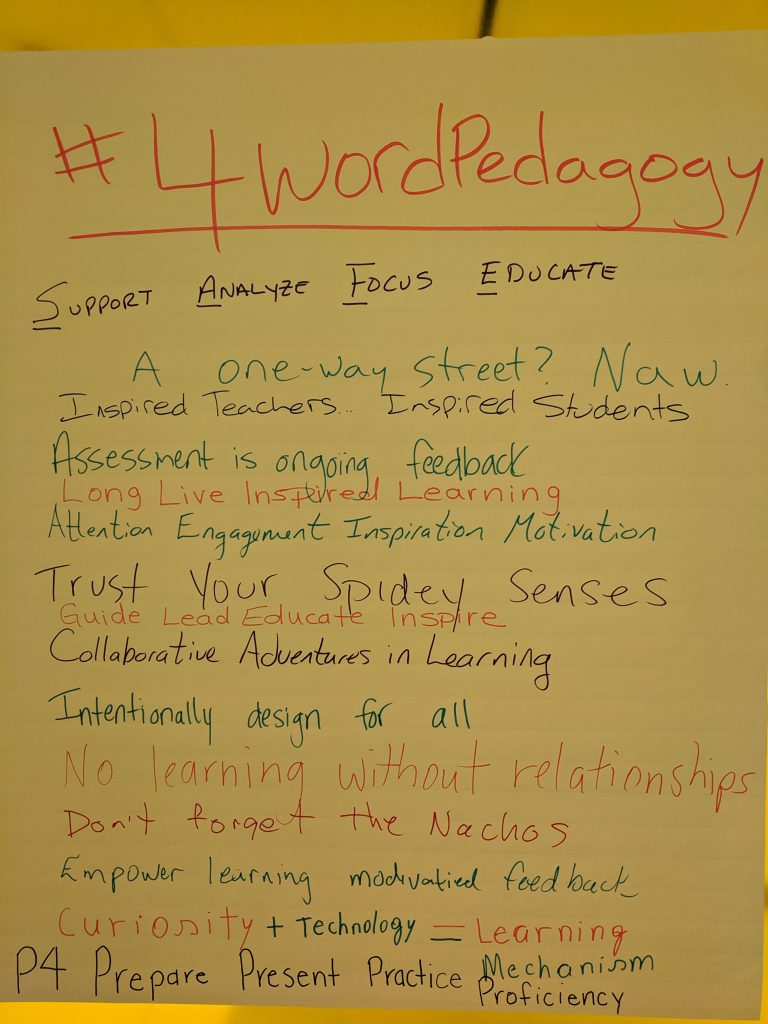
Last week, we welcomed nine new full-time faculty members to the college by putting them through the ringer during the intensive week of the New Faculty Experience. We asked each of them to leave us with a little nugget in the form of #4WordPedagogy. This practice was kicked off a couple years back with the classic “Start by trusting students“. The task is to put an important nugget of our teaching philosophy into just four words. See their responses below and Let us know yours!

Learning Technology

A space for thoughts on where and when in the learning experience some technology might enable deeper learning.

If Learning Technology were a tool shed, D2L/Brightspace would be a big, juicy toolbox in that shed. Sure it has some tools in it that we never use and don’t even know what they are for, but that’s okay. We just want to use the tools most useful for us and our students. This week, The LDS Team is running a couple of Teaching & Learning/D2L Bootcamps at Frost & Sutherland campuses to dig in to those tools and help you choose which ones you want to focus on. See the details here.

Trickle Down

A space to share important events and other things going on in the student world in the hope that you may want to pass on a little reminder.

If you are like us and enjoy both student success and top ten lists, then this link is for you! Check out the Top Ten Tips for College Success that the Fleming Student Success Navigation Team promotes to our students. And, if you feel like being a conduit for such successes to happen, pass these tips along to your students next week!

Inner Workings

A space to dole out timely reminders about the inner workings of the college. Things like policies, procedures, services that are offered, or to spotlight the wonderful work of various college departments.

This week, The Learning Design & Support Team (hey, that’s us!) will host a couple of get-togethers known as the Get It Together sessions for faculty. We invite all kinds of departments to hang out and then we sit there and wait for you to come and tell us what you need to get done to start your semester on a good note. We can help if there is anything you need help with like Course Outlines, D2L course copying, accessibility or [insert other thing here]. If it’s not in our jurisdiction, we point fingers in the right direction. See the details here.

Keeping It Professional

A space to share upcoming professional learning opportunities at the college and beyond.

Are you interested in destroying barriers to learning? If so, then you may be interested in Universal Design for Learning (UDL). On Tuesday, August 27th at 3:00 p.m., join the UDL Higher Education Network to discuss how to spread the word about UDL during September start-up. It’s an online Zoom meeting that you can join here. The meeting includes fellow UDL-ers from around the world and focuses only on higher education. It’s delightfully awesome. Contact jodie.black@flemingcollege.ca for more info.

See details here of a couple other great opportunities that are also offered on Tuesday August the 27th: Teaching English Language Learners, and Cultural Competency for Educators.

We’re Open

Our lines of communication are always open.

Contact us at ext. 1216, email ldsteam@flemingcollege.ca, visit department.flemingcollege.ca/lds, Tweet @fleminglds

css.php